> ## Documentation Index
> Fetch the complete documentation index at: https://docs.bastion.com/llms.txt
> Use this file to discover all available pages before exploring further.
# Sandbox access and test API keys
> How to request access to the Bastion sandbox, create test API keys from the sandbox dashboard, and authenticate against a full-featured replica of the API.
## Bastion sandbox
The Bastion Sandbox is a secure and isolated testing environment designed for developers to experiment with our API without impacting live production data. It provides a full-featured replica of our production API, allowing you to:
* **Test API integrations:** Validate your application's interaction with Bastion's APIs in a risk-free setting.
* **Explore features:** Discover and understand the capabilities of our platform, from managing accounts and identities to stablecoin transfers and webhooks.
* **Build a POC:** Quickly develop and validate proof-of-concept integrations using realistic test data, allowing for efficient building and debugging.
The sandbox environment supports all core API functionalities, including:
* **Account management:** Create, list, and retrieve accounts, and check account balances.
* **Identity services:** Manage individual and business identities, including compliance data submission (KYB/KYC) and payment instruction creation.
* **Stablecoin transfers:** Initiate and track stablecoin transfers.
* **Transaction signing (coming soon):** Test signing raw transactions and data.
* **Webhooks:** Configure and test webhooks for real-time event notifications.
***
## Access sandbox
The sandbox is a test environment you can access by contacting sales. Once you have access, you receive a unique and confidential test API key and can sign in to the Bastion Sandbox Dashboard.
To gain access, contact us at [sales@bastion.com](mailto:sales@bastion.com).
Our team reviews your request and responds with access to the sandbox, along with additional instructions and terms of use.
***
## Sandbox dashboard
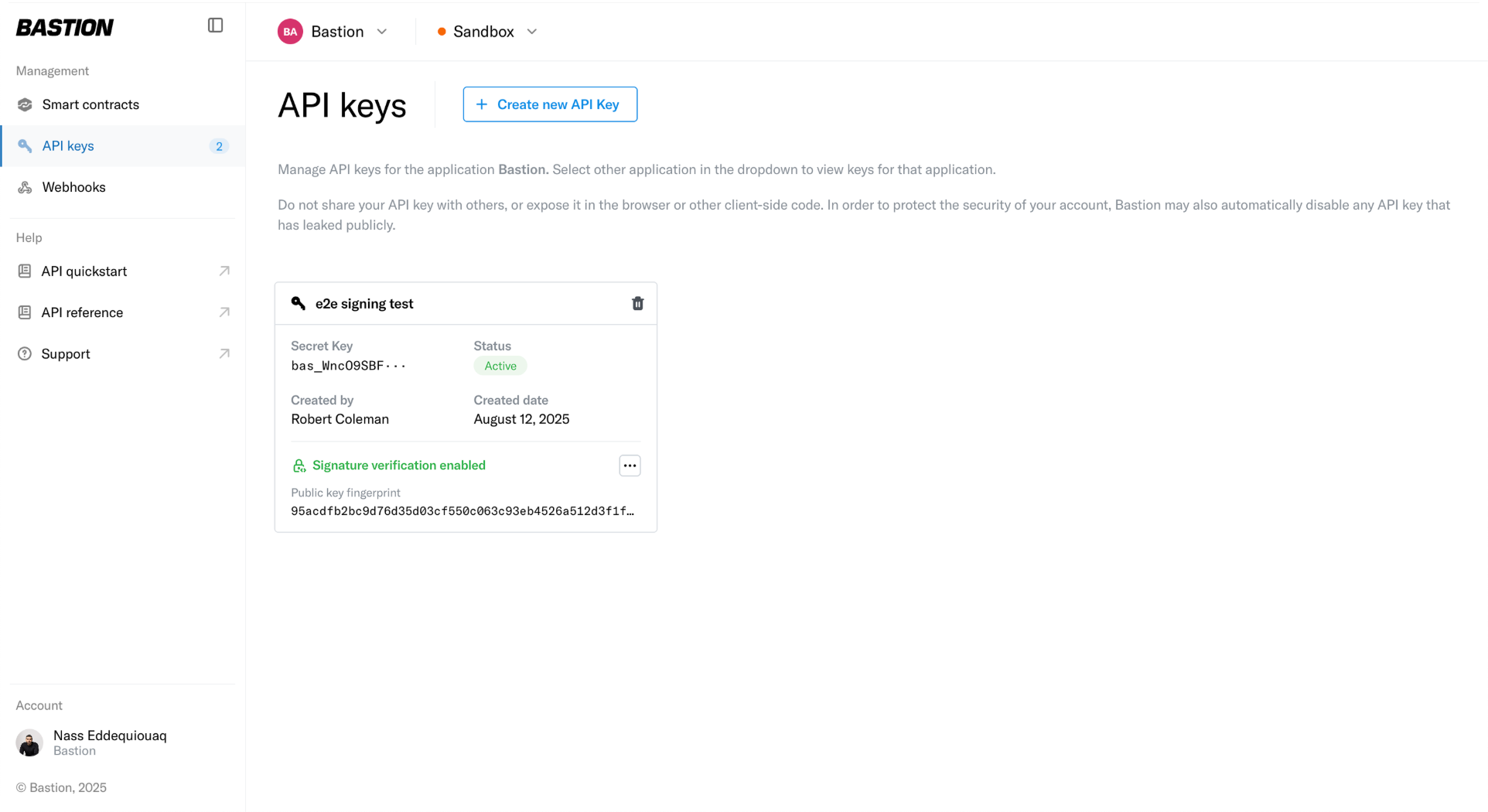
Once you have access to the sandbox environment, head to [the Bastion Sandbox Dashboard](https://dashboard.sandbox.bastion.com/).
 ***
## Sandbox APIs
Our sandbox API base URL is `https://api.sandbox.bastion.io`
The API consumes and produces the following media type:
```text theme={"theme":{"light":"vitesse-light","dark":"vitesse-dark"}}
application/json
```
### Create a sandbox API key
1. Head to the `API keys` tab on the left, and select `Create new API Key`.
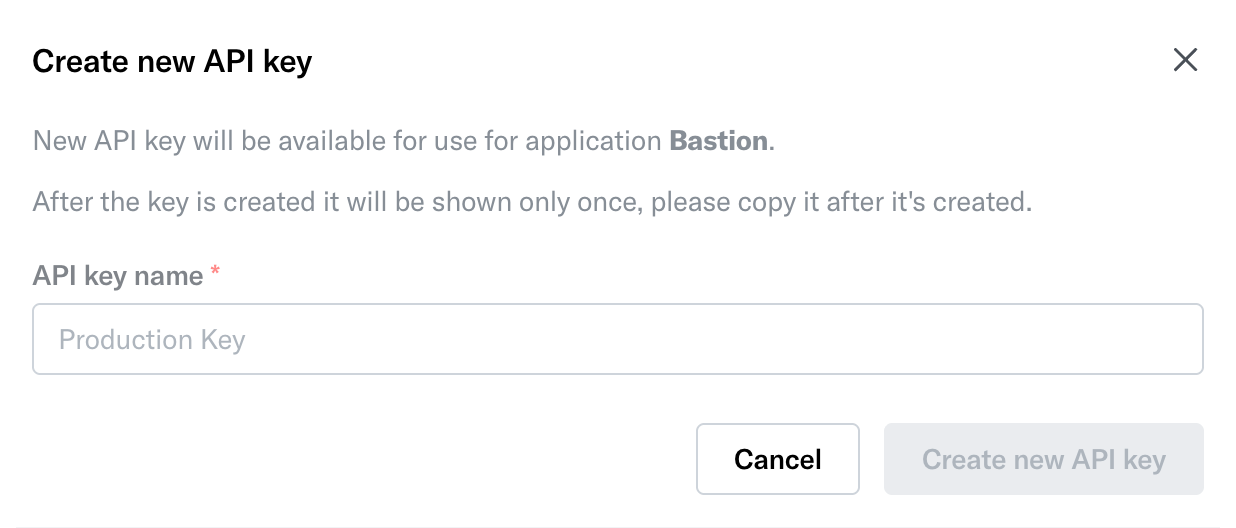
2. A small pop-up window appears, prompting for an API key name.
***
## Sandbox APIs
Our sandbox API base URL is `https://api.sandbox.bastion.io`
The API consumes and produces the following media type:
```text theme={"theme":{"light":"vitesse-light","dark":"vitesse-dark"}}
application/json
```
### Create a sandbox API key
1. Head to the `API keys` tab on the left, and select `Create new API Key`.
2. A small pop-up window appears, prompting for an API key name.
 3. Once an API key name is provided, select `Create new API key`. A secret test API key is displayed for you to save. Make sure to store this test secret key. It is not retrievable afterward.
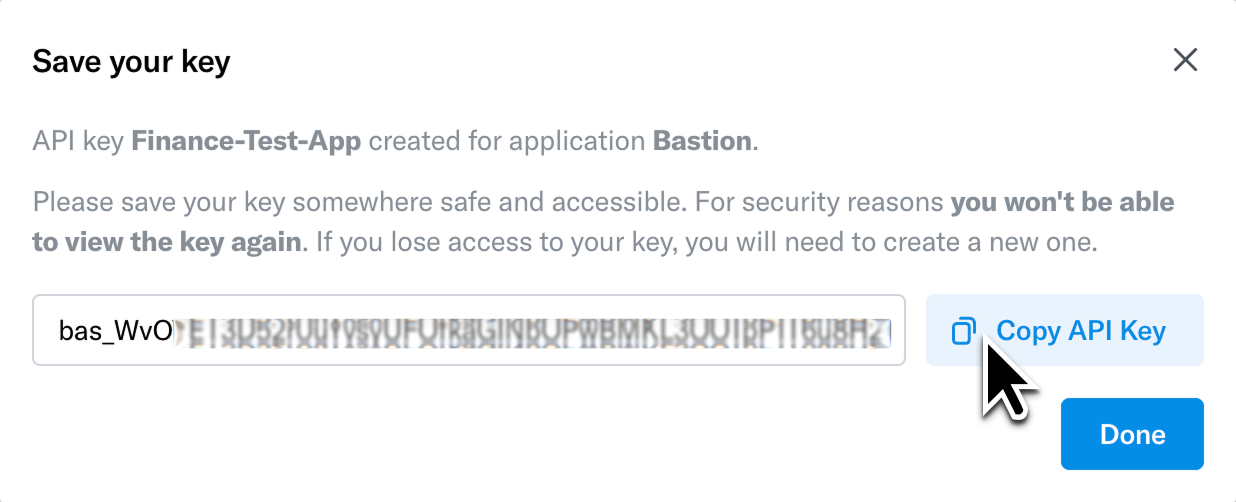 Your API key is unique to your organization. Do not share it with unauthorized individuals or expose it in client-side code, public repositories, or configuration files.
***
## Pass the sandbox API key in request headers
Once you have obtained your API key, include it in the request headers for every API call. Follow these instructions to pass the key in the Authorization header:
1. Set the Authorization header in your HTTP requests.
2. Use the Bearer scheme followed by a space and the API key. The header should look like this:
```http theme={"theme":{"light":"vitesse-light","dark":"vitesse-dark"}}
Authorization: Bearer
```
3. Replace `` with the actual API key provided to you and add it to the request. For example, if you are using cURL to make a request to our API, you can include the Authorization header as follows:
```bash theme={"theme":{"light":"vitesse-light","dark":"vitesse-dark"}}
curl -H "Authorization: Bearer " https://api.sandbox.bastion.io/v2/accounts
```
### Stablecoin transfer API call example
Here's an example of submitting a stablecoin transfer using cURL:
```bash theme={"theme":{"light":"vitesse-light","dark":"vitesse-dark"}}
curl -X POST \
https://api.sandbox.bastion.io/v2/stablecoins/transfers \
-H "Authorization: Bearer " \
-H "Content-Type: application/json" \
-d '{
"request_id": "a1b2c3d4-e5f6-7890-1234-567890abcdef",
"amount": "100.00",
"on_behalf_of": "your_account_id",
"payment_purpose": "PERSONAL_REMITTANCE",
"source": {
"currency": "USDC",
"payment_rail": "ETHEREUM_SEPOLIA"
},
"destination": {
"currency": "USDC",
"payment_rail": "ETHEREUM_SEPOLIA"
}
}'
```
***
## Conclusion
By following these steps, you can obtain a sandbox API key and pass it in request headers to authenticate your API calls. If you have any questions or encounter issues, contact our team for assistance.
We recommend familiarizing yourself with our API documentation and exploring the available endpoints and functionalities to make the most of our API.
Get in touch with our sales team at [sales@bastion.com](mailto:sales@bastion.com) to get started!
## Related topics
- [Sandbox vs. production environments](/guides/getting-started/sandbox-vs-production-environments.md)
- [API authentication with Bearer keys](/v2/api-reference/authentication/overview.md)
- [Bastion platform overview](/guides/getting-started/bastion-platform-overview.md)
- [Sandbox testing and simulation labels](/guides/getting-started/sandbox-testing-and-simulations.md)
- [Compliance API overview](/v2/api-reference/compliance/overview.md)
Your API key is unique to your organization. Do not share it with unauthorized individuals or expose it in client-side code, public repositories, or configuration files.
***
## Pass the sandbox API key in request headers
Once you have obtained your API key, include it in the request headers for every API call. Follow these instructions to pass the key in the Authorization header:
1. Set the Authorization header in your HTTP requests.
2. Use the Bearer scheme followed by a space and the API key. The header should look like this:
```http theme={"theme":{"light":"vitesse-light","dark":"vitesse-dark"}}
Authorization: Bearer
```
3. Replace `` with the actual API key provided to you and add it to the request. For example, if you are using cURL to make a request to our API, you can include the Authorization header as follows:
```bash theme={"theme":{"light":"vitesse-light","dark":"vitesse-dark"}}
curl -H "Authorization: Bearer " https://api.sandbox.bastion.io/v2/accounts
```
### Stablecoin transfer API call example
Here's an example of submitting a stablecoin transfer using cURL:
```bash theme={"theme":{"light":"vitesse-light","dark":"vitesse-dark"}}
curl -X POST \
https://api.sandbox.bastion.io/v2/stablecoins/transfers \
-H "Authorization: Bearer " \
-H "Content-Type: application/json" \
-d '{
"request_id": "a1b2c3d4-e5f6-7890-1234-567890abcdef",
"amount": "100.00",
"on_behalf_of": "your_account_id",
"payment_purpose": "PERSONAL_REMITTANCE",
"source": {
"currency": "USDC",
"payment_rail": "ETHEREUM_SEPOLIA"
},
"destination": {
"currency": "USDC",
"payment_rail": "ETHEREUM_SEPOLIA"
}
}'
```
***
## Conclusion
By following these steps, you can obtain a sandbox API key and pass it in request headers to authenticate your API calls. If you have any questions or encounter issues, contact our team for assistance.
We recommend familiarizing yourself with our API documentation and exploring the available endpoints and functionalities to make the most of our API.
Get in touch with our sales team at [sales@bastion.com](mailto:sales@bastion.com) to get started!
## Related topics
- [Sandbox vs. production environments](/guides/getting-started/sandbox-vs-production-environments.md)
- [API authentication with Bearer keys](/v2/api-reference/authentication/overview.md)
- [Bastion platform overview](/guides/getting-started/bastion-platform-overview.md)
- [Sandbox testing and simulation labels](/guides/getting-started/sandbox-testing-and-simulations.md)
- [Compliance API overview](/v2/api-reference/compliance/overview.md)