> ## Documentation Index
> Fetch the complete documentation index at: https://docs.bastion.com/llms.txt
> Use this file to discover all available pages before exploring further.
# API authentication overview
> How Bastion authenticates API requests: Bearer API keys, optional JWT request signing with ES256, key storage, and choosing the right method for your use case.
## Overview
Bastion supports two authentication methods:
| Method | Security Level | Use Case |
| ----------------------------- | -------------- | ------------------------- |
| **API Key (Bearer Token)** | Standard | Server-to-server requests |
| **API Key + Request Signing** | Enhanced | High-security operations |
***
## API keys
Bastion API keys use the `bas_` prefix:
```text theme={"theme":{"light":"vitesse-light","dark":"vitesse-dark"}}
bas_xxxxxxxxxxxxxxxxxxxxxxxxxxxxxxxxxxxxxxxx
```
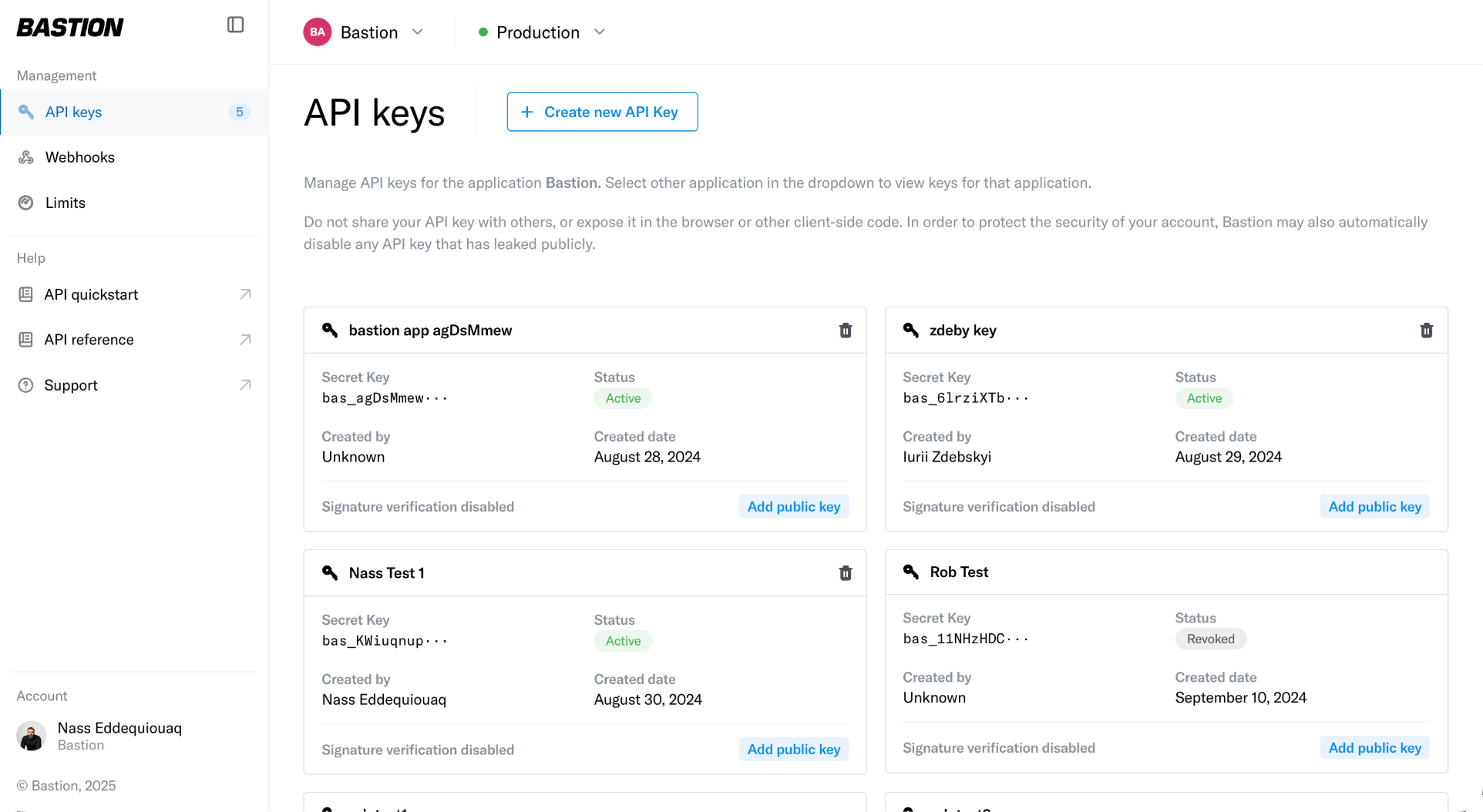
API Keys can be created through your dashboard in the `API keys` tab:
 Include your API key as a Bearer token:
```bash theme={"theme":{"light":"vitesse-light","dark":"vitesse-dark"}}
curl -X GET https://api.prod.bastion.com/v2/accounts \
-H "Authorization: Bearer bas_your_api_key_here"
```
**Security:**
* Keys stored as BLAKE2b hashes (never raw)
* Full key shown only once at creation
* Can be revoked immediately
***
## Request signing (enhanced authentication)
For higher-security operations, add asymmetric request signing using ECDSA P-256 keys.
### Setup
1. Generate an ECDSA P-256 key pair
2. Register your public key in your Bastion dashboard (linked to your API key)
Include your API key as a Bearer token:
```bash theme={"theme":{"light":"vitesse-light","dark":"vitesse-dark"}}
curl -X GET https://api.prod.bastion.com/v2/accounts \
-H "Authorization: Bearer bas_your_api_key_here"
```
**Security:**
* Keys stored as BLAKE2b hashes (never raw)
* Full key shown only once at creation
* Can be revoked immediately
***
## Request signing (enhanced authentication)
For higher-security operations, add asymmetric request signing using ECDSA P-256 keys.
### Setup
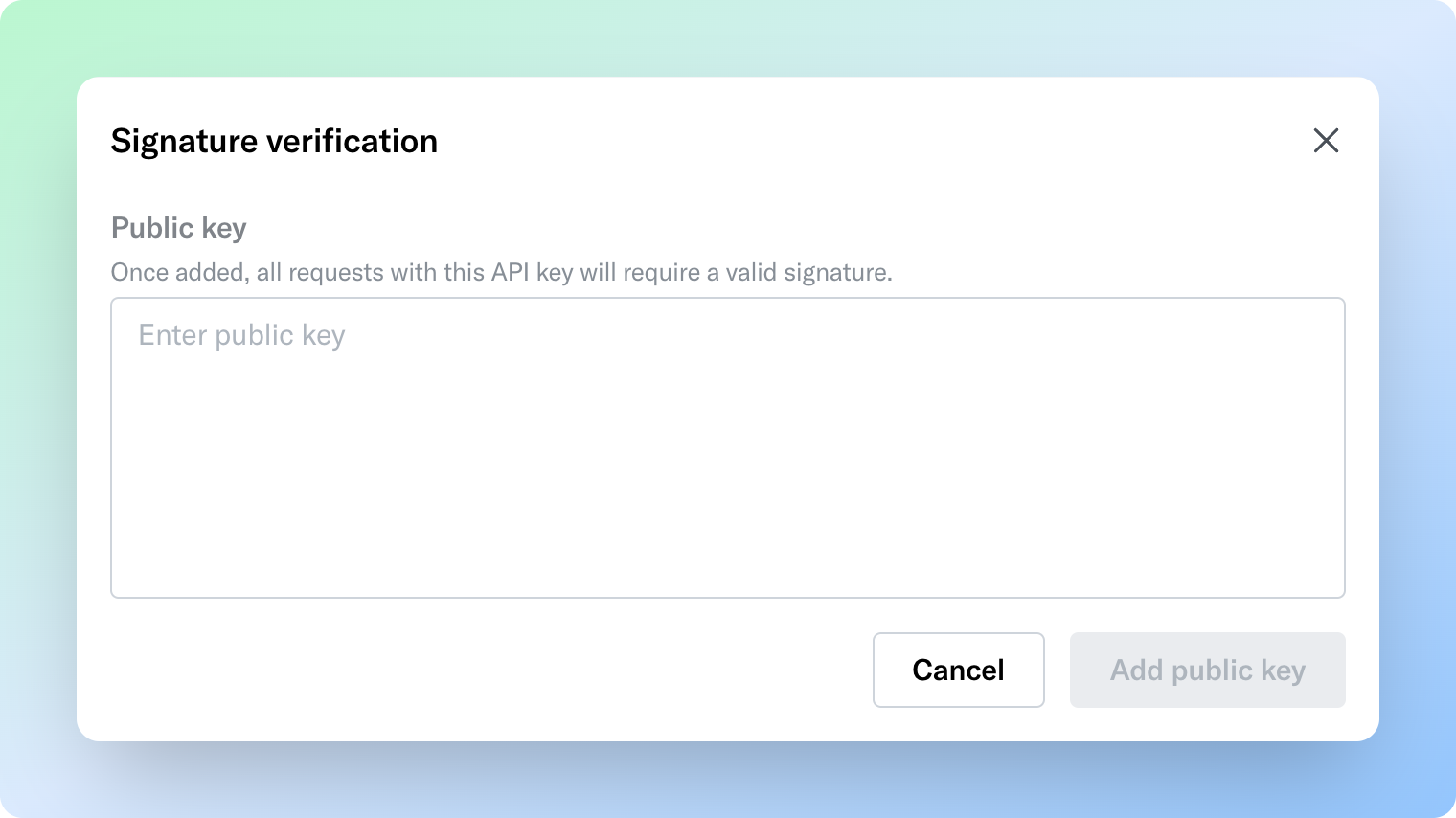
1. Generate an ECDSA P-256 key pair
2. Register your public key in your Bastion dashboard (linked to your API key)
 3. Sign each request with your private key
### Signature contents
Sign a JWT claim containing:
| Claim | Description |
| ------------ | --------------------------------------------------------------------- |
| `iat` | Timestamp (must be within 30 seconds) |
| `req-method` | HTTP method |
| `req-path` | Request path |
| `body` | SHA-256 hash (hex-encoded) of the request body; omit for `GET`/`HEAD` |
Bastion validates the signature and timestamp before processing. Requests outside the 30-second window are rejected to prevent replay attacks.
Follow the [API Request Signing Guide](/v2/api-reference/authentication/request-signing) for a full overview of the API request signing process with examples.
***
## Security best practices
* **Never expose API keys in client-side code**
* **Store keys in secrets managers**
* **Rotate API keys periodically**
* **Protect private signing keys** — use HSM or secrets manager
## Related topics
- [API authentication with Bearer keys](/v2/api-reference/authentication/overview.md)
- [Sandbox vs. production environments](/guides/getting-started/sandbox-vs-production-environments.md)
- [Webhooks API overview](/v2/api-reference/webhooks/overview.md)
- [Compliance API overview](/v2/api-reference/compliance/overview.md)
- [Identities API overview](/v2/api-reference/identities/overview.md)
3. Sign each request with your private key
### Signature contents
Sign a JWT claim containing:
| Claim | Description |
| ------------ | --------------------------------------------------------------------- |
| `iat` | Timestamp (must be within 30 seconds) |
| `req-method` | HTTP method |
| `req-path` | Request path |
| `body` | SHA-256 hash (hex-encoded) of the request body; omit for `GET`/`HEAD` |
Bastion validates the signature and timestamp before processing. Requests outside the 30-second window are rejected to prevent replay attacks.
Follow the [API Request Signing Guide](/v2/api-reference/authentication/request-signing) for a full overview of the API request signing process with examples.
***
## Security best practices
* **Never expose API keys in client-side code**
* **Store keys in secrets managers**
* **Rotate API keys periodically**
* **Protect private signing keys** — use HSM or secrets manager
## Related topics
- [API authentication with Bearer keys](/v2/api-reference/authentication/overview.md)
- [Sandbox vs. production environments](/guides/getting-started/sandbox-vs-production-environments.md)
- [Webhooks API overview](/v2/api-reference/webhooks/overview.md)
- [Compliance API overview](/v2/api-reference/compliance/overview.md)
- [Identities API overview](/v2/api-reference/identities/overview.md)