> ## Documentation Index
> Fetch the complete documentation index at: https://docs.bastion.com/llms.txt
> Use this file to discover all available pages before exploring further.
# Transaction limits API overview
> Configure per-transaction and weekly transaction limit policies for the Submit Cryptocurrency Transfer endpoint, with hard blocks or soft webhook alerts.
## Transaction limit policy configuration
You can create, update, enable, and disable transaction limit policies via the [Bastion admin dashboard](https://dashboard.bastion.com), as shown in the screenshots below. You can view transaction limit policies either via the Bastion admin dashboard, or via API through the [Get Transaction Limit Policy](/v2/api-reference/transaction-limits/get-transaction-limit-policy) or [List Transaction Limit Policies](/v2/api-reference/transaction-limits/list-transaction-limit-policies) endpoints.
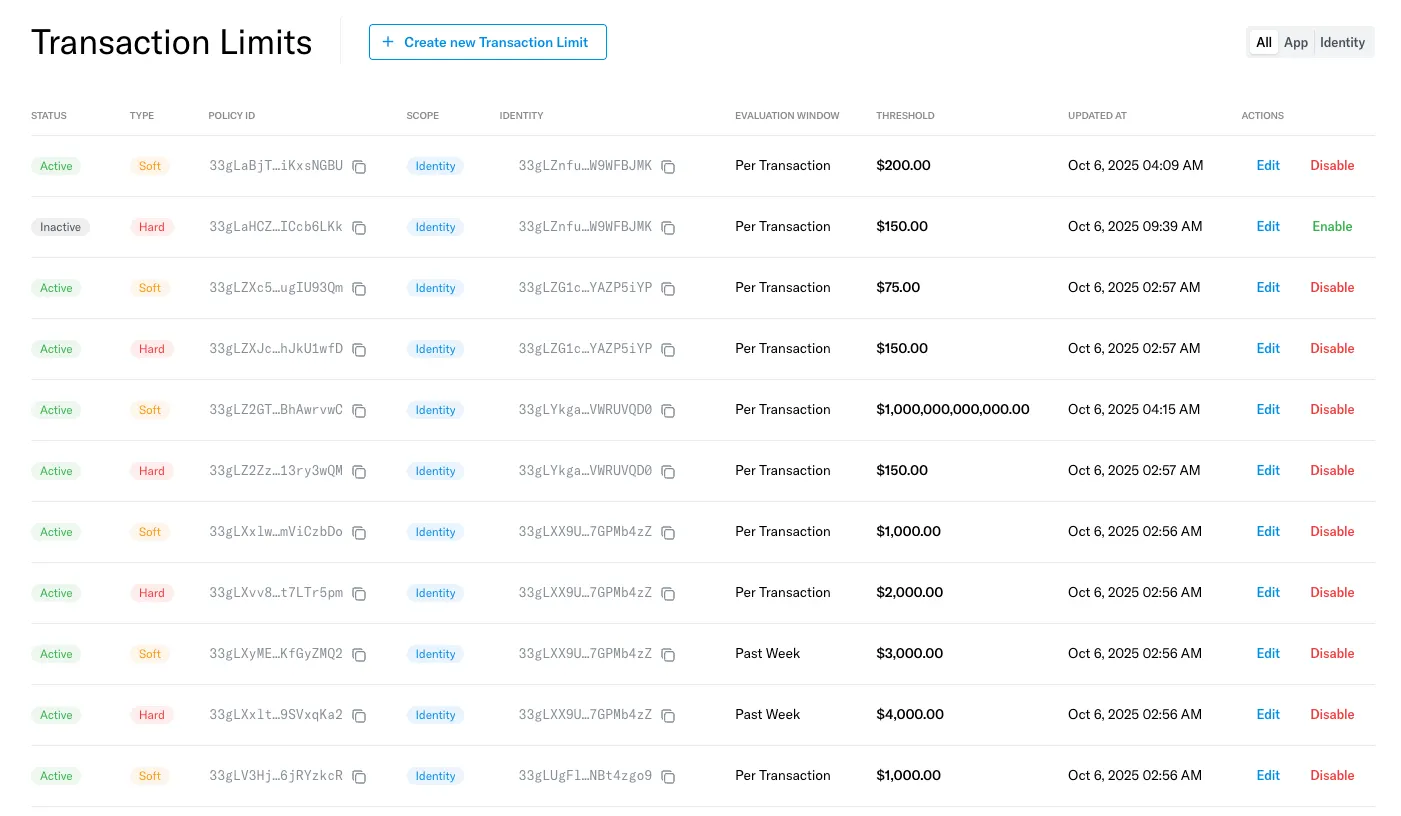
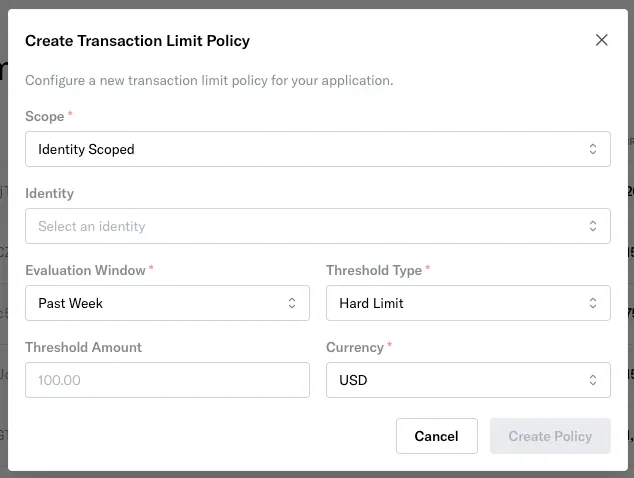
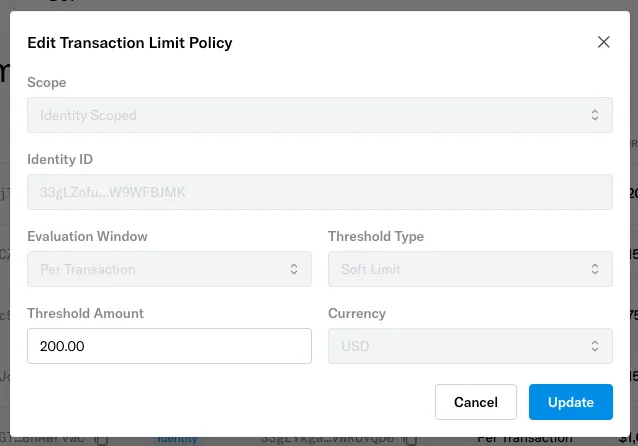 Creation of a transaction limit policy involves defining the following properties:
| Name | Description |
| ---------------------- | ------------------------------------------------------------------------------------------------------------------------------------------------------------------------------------------------------------------------------------------------------------------------------------------------------------------------------------------------------------------------------------------------------------------------------------------------------------------------------------ |
| **Scope** | This property describes who the policy applies to. It can be set to one of the following two values:
Creation of a transaction limit policy involves defining the following properties:
| Name | Description |
| ---------------------- | ------------------------------------------------------------------------------------------------------------------------------------------------------------------------------------------------------------------------------------------------------------------------------------------------------------------------------------------------------------------------------------------------------------------------------------------------------------------------------------ |
| **Scope** | This property describes who the policy applies to. It can be set to one of the following two values:
- **App Scoped**: The policy will apply to all identities in your application.
- **Identity Scoped:** The policy will apply to a specific identity. |
| **Identity ID** | The identity ID that the policy applies to. This property is only relevant for **Identity Scoped** policies. |
| **Evaluation Window** | This property describes what set of transactions is taken into account when evaluating a policy. It can be set to one of the following two values:
- **Per Transaction**: Only the current transaction is used to evaluate the policy (i.e. the policy sets a maximum value for any single transaction).
- **Past Week**: The cumulative value of given identity’s transactions over the past week (including the current transaction) is used to evaluate the policy. |
| **Threshold Type** | This property describes what behavior will be executed if the transaction limit is breached. It can be set to one of the following two values:
- **Hard**: Transactions that breach the policy will be blocked AND trigger webhook notifications (see [webhook documentation here](/v2/api-reference/webhooks/notifications/transaction-limit-notifications)).
- **Soft**: Transactions that breach the policy will trigger webhook notifications but will NOT be blocked. |
| **Threshold Amount** | The minimum transacted amount that will cause a policy to be breached. |
| **Threshold Currency** | The currency that the threshold amount is defined in. At the moment, only **USD** is supported. |
Note that there can only be one transaction limit policy per unique combination of the following fields: `Scope`, `Evaluation Window`, `Threshold Type`, and `Identity ID`. These four fields are also immutable once a policy is created, in other words, only a policy’s `Threshold Amount` may be updated after creation.
## Transaction limit policy evaluation
Up to four transaction limit policies may apply to a given identity — i.e. one per unique combination of `Evaluation Window` and `Threshold Type`. In other words, an identity will be subject to at most:
* One policy with `Evaluation Window = Past Week`, and `Threshold Type = Hard`
* One policy with `Evaluation Window = Past Week`, and `Threshold Type = Soft`
* One policy with `Evaluation Window = Per Transaction`, and `Threshold Type = Hard`
* One policy with `Evaluation Window = Per Transaction`, and `Threshold Type = Soft`
If there is both an `App Scoped` and relevant `Identity Scoped` policy with the same values for `Evaluation Window` and `Threshold Type`, then **the `Identity Scoped` policy will take precedence over the `App Scoped` policy**.
As an example, consider a scenario where the following policies are set:
* A policy with `Scope = App Scoped`, `Evaluation Window = Past Week`, and `Threshold Type = Hard`
* A policy with `Scope = Identity Scoped`, `Identity Id = Identity123`, `Evaluation Window = Past Week`, and `Threshold Type = Hard`
If `Identity123` submits a cryptocurrency transfer, it would be subject to the second policy rather than the first policy.
## Related topics
- [Transaction limit notifications](/v2/api-reference/webhooks/notifications/transaction-limit-notifications.md)
- [List Transaction Limit Policies](/v2/api-reference/transaction-limits/list-transaction-limit-policies.md)
- [Get Transaction Limit Policy](/v2/api-reference/transaction-limits/get-transaction-limit-policy.md)
- [Bastion platform overview](/guides/getting-started/bastion-platform-overview.md)
- [Product updates](/changelog.md)