

Overview
The Send Crypto feature allows you to transfer cryptocurrency from a Bastion account to a supported blockchain address. Transfers are submitted on-chain and settled according to the selected network.Prerequisites
- A Bastion account with a sufficient balance of the asset you want to send
- The recipient’s blockchain address and target chain
Steps
1
Navigate to identity page
From the Bastion Dashboard sidebar, select Identities → navigate into the approved identity.
2
Select Transfer from the source account
Select the Transfer button in the top-right corner of the source account that you wish to send cryptocurrency from.
3
Provide required crypto transfer details
A Transfer Cryptocurrency modal opens. Provide the required details and submit the transfer.Required information: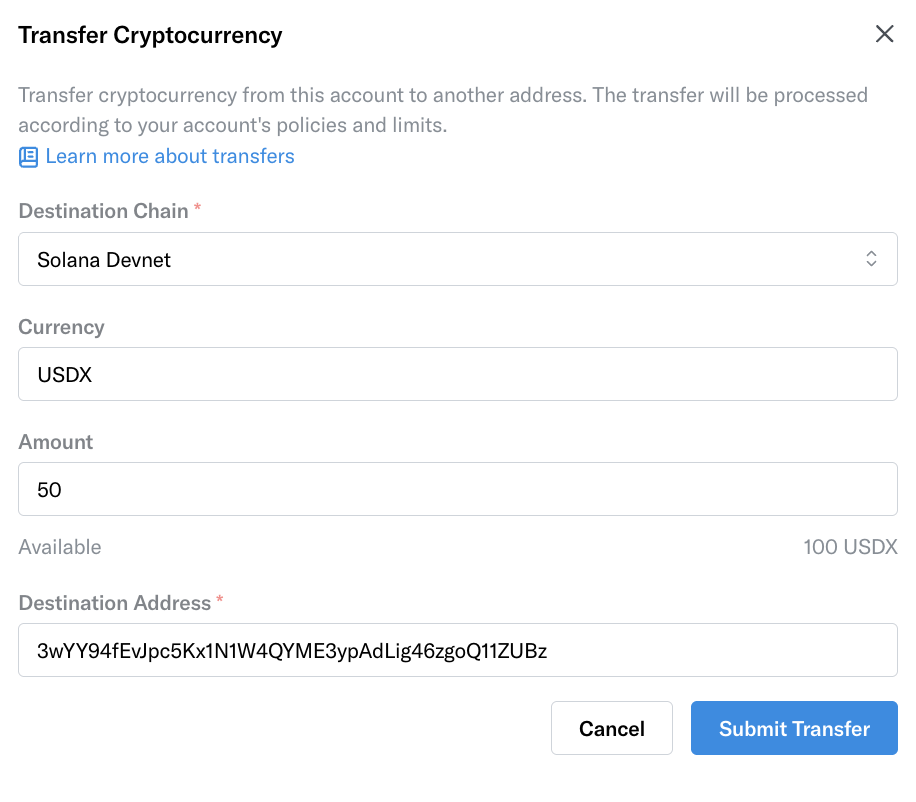
- Destination Chain
- Currency (USDC, SOL, etc.)
- Amount: Asset’s standard unit (e.g., enter
10to send 10 USDC or 0.5 to send 0.5 SOL). - Destination Address
4
View transfer status
Navigate to the History tab and select Transfers. You can view a history of all submitted crypto transfers along with their statuses.